Your audit starts here.Search terms · Bids · Placements
LOOK FOR THIS IN AMAZON
IN AMAZON · DOWNLOAD CAMPAIGNS
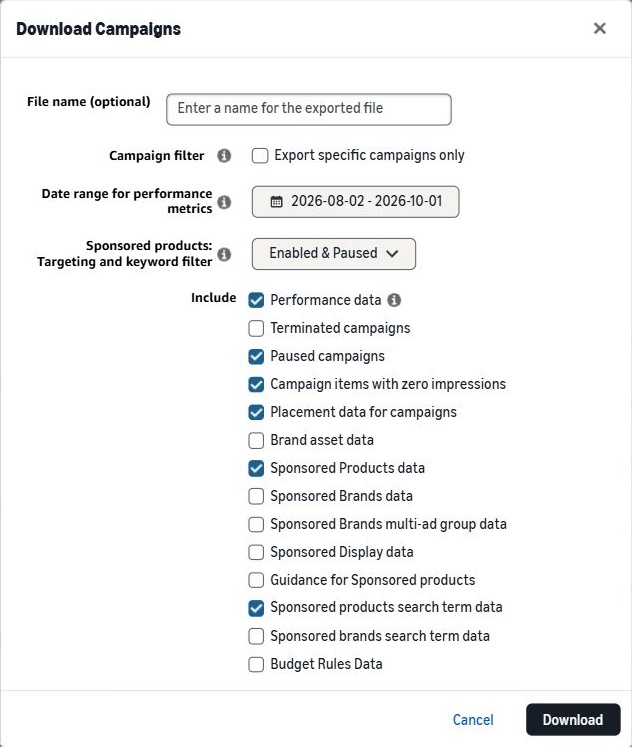
Choose your export settings.
Match these options before downloading.
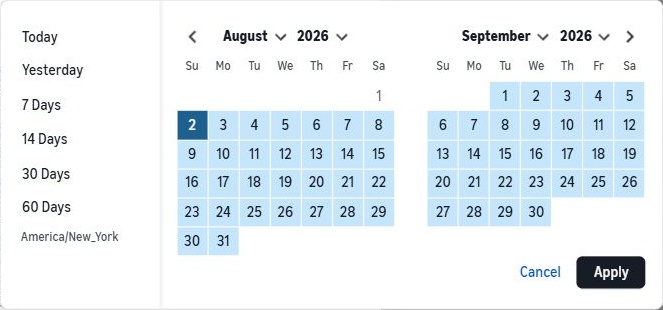
Date range
60 Days
Targets
Enabled & Paused
Campaigns
All campaigns
CHECK THESE SIX BOXES
✓Performance data
✓Paused campaigns
✓Campaign items with zero impressions
✓Placement data for campaigns
✓Sponsored Products data
✓Sponsored products search term data
Keep Enabled & Paused. Leave “Export specific campaigns only” and the other boxes off.
Show where to select 60 DaysChoose 60 Days on the left. Click Apply if the picker stays open. Your dates will differ.My page says “Exclude”
Leave paused campaigns, zero-impression items, and placement data unchecked in the Exclude list. Keep Sponsored Products and search-term data included.
Leave File name (optional) blank so Amazon keeps the report dates in the filename. Click Download. When the export shows Success, use the download link in that row.
Keep the original XLSX and its filename. You’ll upload it in the next step.
XLSX
AMAZON ADS / BULK EXPORT
Amazon bulk workbookXLSX · Up to 200 MiB · Keep the original filename
Amazon may take a few minutes to prepare your export.
Upload your file to run the audit.
STEP 4
Upload the Amazon XLSX and enter your break-even ACoS or ROAS. We’ll check your search terms, bids, placements, and inactive targets.
Already have an account? to keep your reports together.
No file selectedBreak-even not setReady to upload
Check your audit coverage
Some sections need more data. Your free audit is still available. Continue with what we can check, or replace the file.


 Enlarge screenshot ↗

