← All guides

PPC AD SWEEP · PRACTICAL GUIDES

Get your Amazon PPC audit in five steps

Get the right Bulk operations XLSX, upload it, and save your audit.

Use the original Bulk operations XLSX. A search-term CSV or blank upload template cannot provide this audit.

  1. Open Amazon Bulk operations

    Choose your USD advertising account, then Campaigns → Bulk operations → Download campaigns.

    Open Amazon Bulk operations ↗
  2. Set up the download

    Choose 60 Days and Enabled & Paused targets. Leave Export specific campaigns only off. Under Include, check all six options below. Leave other ad formats off.

    CHECK THESE SIX BOXES

    • Performance data
    • Paused campaigns
    • Campaign items with zero impressions
    • Placement data for campaigns
    • Sponsored Products data
    • Sponsored products search term data

    Keep Enabled & Paused. Leave “Export specific campaigns only” and the other boxes off.

    Show where to select 60 Days
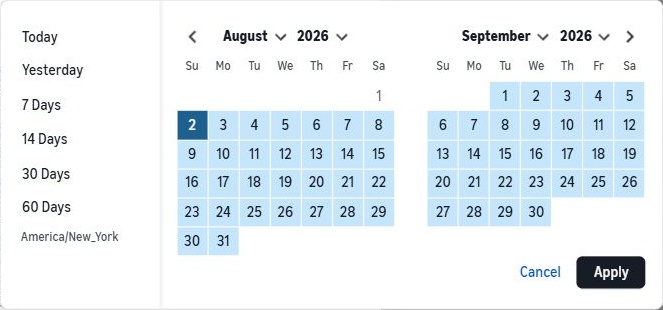
    Amazon date picker: choose 60 Days from the left-hand list. The selected range appears in blue.
    Choose 60 Days on the left. Click Apply if the picker stays open. Your dates will differ.
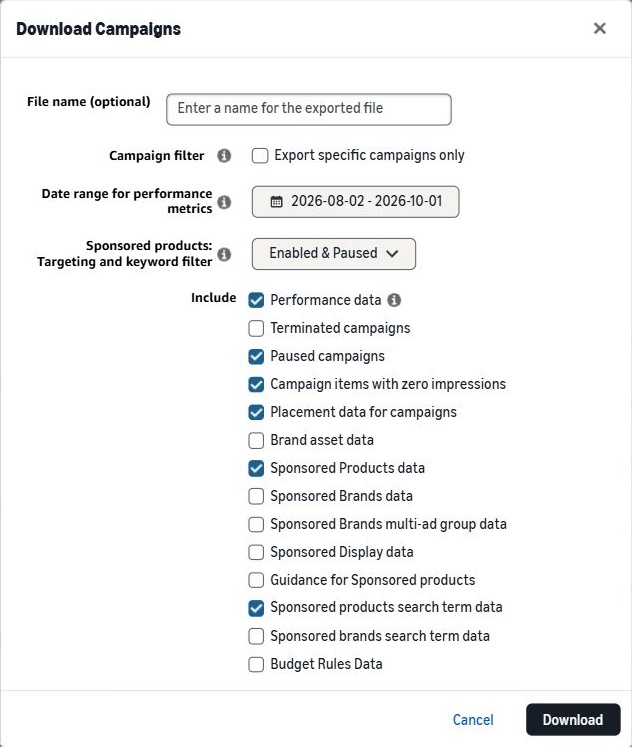
    Amazon Download Campaigns window with all six required Include options checked, Enabled and Paused selected, and Export specific campaigns only unchecked.Enlarge screenshot ↗
    Actual Amazon console · All six required options selected
    My Amazon page says “Exclude”

    Leave the exclusions for paused campaigns, zero-impression items and placement data unchecked. Keep Sponsored Products and search-term data included.

  3. Download the finished XLSX

    Leave File name (optional) blank, click Download, then download the completed file. Keep its original name and contents.

  4. Upload and enter your break-even

    Choose the XLSX here and enter your break-even ACoS or ROAS. Unsure? Use the calculator beside the field.

    Calculate break-even ↗
  5. Save and review your audit

    Open your report. Sign in or create an account and verify your email if prompted. All five audit sections are saved together.

File rejected or a section missing?

Use one USD account, 30–65 days (60 recommended), and an XLSX under 15 MB. Keep Amazon’s filename. Recheck all six Include options above. Some campaigns may still lack enough performance data; the audit will explain what is missing before using your free report.

See Amazon’s bulksheet instructions.

Put the checklist to work.

Upload your original bulk workbook. Review your first complete PPC cleanup report free.

Start my first report →
YOUR WEEKLY CLEANUP

Get your complete report.

Save your report and pick up where you left off.

or use email

Your reports stay private.

Your file is processed securely on our server. We never connect to Amazon or change your campaigns.

We collect your first name, last name and email to save your report. Background audits temporarily store uploaded workbooks in private Cloudflare R2 storage and process them on Render. Source files are deleted after a successful audit; remaining files and unfinished uploads are scheduled for automatic deletion after one day. Temporary processing files are removed when the task finishes. Your report results are stored in our database. Only you can access your saved reports through your account, or the browser session used to save a guest report.

The public counter shows aggregate estimated waste found, not confirmed savings. It never shows your identity, campaigns or search terms. Duplicate findings are not counted again.

We keep a first-party event record for page activity, report completion, account creation and checkout, with campaign labels and a hashed browser identifier. It helps us understand which sources bring customers. Calculations entered in the free calculator are not recorded.

If you allow optional analytics, Google Analytics receives only an aggregate page name and approved campaign source, medium, campaign, and content labels. We do not send report URLs, report names, referrer URLs, search terms, account details, lead tokens, or Amazon Ads data. You can reject analytics or withdraw consent here at any time.

Neon manages account sign-in and verification emails. Guest previews expire after 24 hours. Canceling a subscription schedules paid report deletion after the paid period. Your first free report stays available; account, sign-in, and billing records are retained. After account deletion, a keyed marker of a used free trial remains to prevent repeat trials. Downloads already saved on your device are unaffected.

Verify your email.

Verify once to save your first complete PPC cleanup report.

Reset your password.